Enterprise Display Management: What Is Samsung MagicINFO? Features and Licensing Guide
The components of Samsung MagicINFO software and the corporate benefits of cloud-based content management systems with Lite, Premium, and RM licensing models.
What Is Samsung MagicINFO? Enterprise Digital Signage Management
One of the greatest needs of large-scale businesses, chain stores, airports, and corporate holding companies is the ability to manage hundreds or even thousands of digital displays securely, stably, and reliably from a single central location. Developed by global technology manufacturer Samsung, Samsung MagicINFO is an all-in-one enterprise digital signage software platform that brings together content creation, scheduling, network-based distribution, and remote hardware device management processes for smart commercial displays (Smart Signage) under one roof.
Unlike traditional content management systems (CMS), MagicINFO operates in 100% synchronization with the SSSP (Samsung Smart Signage Platform) hardware chips embedded within the screens by Samsung (System on Chip – SoC), completely eliminates the need for an external media player PC or set-top box, providing businesses with massive savings on hardware, cabling, and labor.
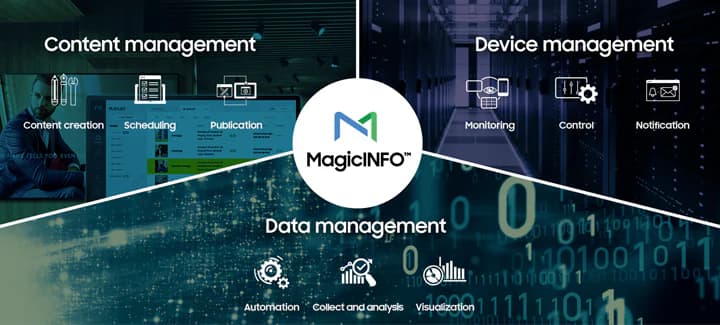
Figure 1: Secure Data and Content Distribution Architecture for a Multi-Screen Network via the Central MagicINFO Server
The 3 Core Building Blocks of the Samsung MagicINFO System
The platform consists of three main software components that work together to establish a full-scale, seamless corporate communication network:
- MagicINFO Author (Content Design Tool): An advanced design editor that allows you to create professional web templates, 4K video loops, scrolling text, and interactive content using a drag-and-drop method. Thanks to the WebAuthor interface, it is accessible from anywhere via a web browser.
- MagicINFO Server (Central Management Gateway): This is the brain of the system, running either in the cloud or on an on-premises server. It schedules calendar-based playlists for all screens, manages user permissions, and monitors the real-time health status of the screens.
- MagicINFO Player (Embedded Media Player): This is the firmware software built into Samsung industrial monitors. It stores data received from the server in local memory and provides failover protection to prevent the broadcast from freezing even if the internet connection is lost.
Samsung MagicINFO Lite and Premium License Comparison
Samsung offers two main licensing models tailored to the scale and technical needs of businesses. To properly plan your project’s budget, you can review the hardware and software differences between the two license types in the comparison table below:
Advanced Hardware Management: MagicINFO RM (Remote Management) Module
In large corporate networks, not only what is displayed on screens but also their physical condition is of vital importance to IT departments. The **MagicINFO RM** license grants IT administrators full remote access to the hardware settings of the screens. The display’s internal temperature, voltage levels, and network connection quality can be monitored in real time. In the event of any hardware error, the system automatically sends an alert email to the IT administrator. Additionally, software (firmware) updates for the displays can be performed in bulk with a single click from the server, without the need to go to each display individually.
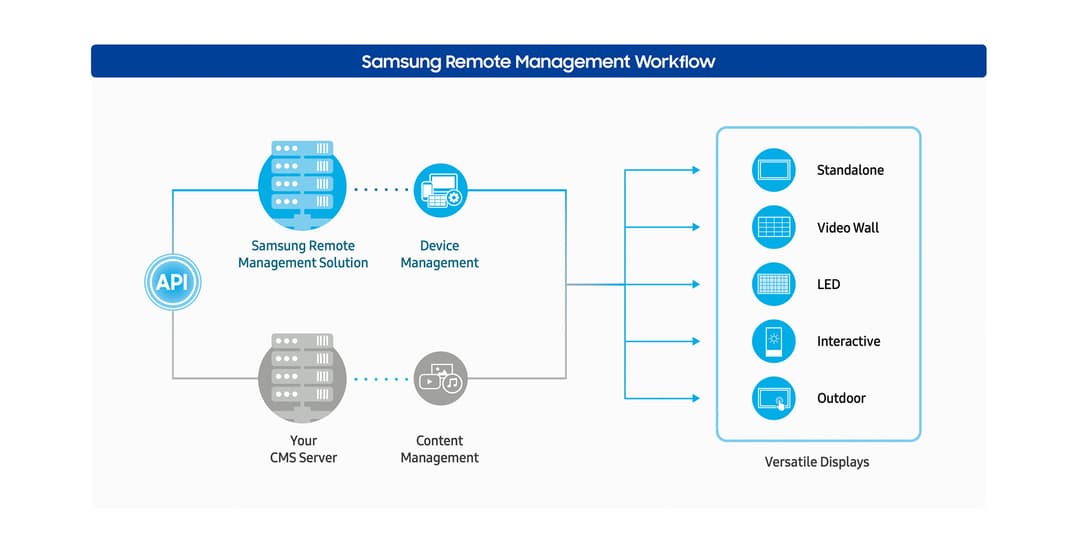
Figure 2: Secure Remote Access to Hardware Settings of Screens Worldwide with MagicINFO RM
Why Choose Koz Teknoloji for Samsung MagicINFO Solutions?
The installation and license configuration of Samsung enterprise display software require advanced network and systems engineering expertise. Incorrect license selection or faulty server installations can lead to data security vulnerabilities and operational disruptions. At Koz Teknoloji, we determine the Samsung Lite or Premium licensing model best suited to your business based on the number of branches, content type, and network infrastructure.
We offer end-to-end, turnkey services that include on-premise server installation, cloud server rental, user role authorizations, and professional training for your IT staff. To transform your digital signage network into a professional ecosystem, get up-to-date information on Samsung licensing prices, and strengthen your corporate communication strategy, contact our team of experts in centrally managed digital signage solutions today.